


PreInk – Tattoo design maker
3.5899.00 Reviews
App Specs
- Version
- 1.3.15
- Updated On
- License
- Free
- Downloads
- 1,000,000+
- Developer
- RefaceEuropeUAB
- Categories
- Art & Design
- Platform
- Android, iOS
Screenshots
 Analysis by AppCompare
I treat a tattoo idea as a starting point, not a decision, and that is where Ink AI – Tattoo Design Maker makes the most sense. It is an art-and-design app from RefaceEuropeUAB that lets you explore concepts before you bring anything to a tattoo artist. The creative payoff is quick, but I would use its results as inspiration rather than as a finished, tattoo-ready design.
A quick idea generator, not a replacement for an artist
The central appeal is being able to turn a rough thought into a visual direction. If you know the subject but not the style, an AI-generated concept can give you something concrete to react to: perhaps you discover that a clean outline feels right, or that a more decorative look is too busy for you. That first reaction is useful even when the generated image is not the design you ultimately choose.
I would be specific about the parts of an idea that matter most to you before generating anything: the subject, mood, broad visual style, and how simple or detailed you want the result to feel. Then change one preference at a time when exploring alternatives. This makes it easier to see what actually improves a design, instead of producing a pile of images that differ in several ways and are hard to compare.
Who will get the most out of it
Ink AI is a good fit for someone with a tattoo appointment on the horizon who needs help explaining an idea, or for a curious first-timer who is still deciding whether a concept feels personal. It can also suit an existing tattoo fan who enjoys collecting visual references. The useful outcome is not necessarily a final image; it may simply be a clearer brief to take into a conversation with an artist.
It is less suitable if you already have a precise composition and need exact linework, lettering, or placement. A tattoo artist can adjust a design to the body, the size of the finished piece, and the practical demands of skin in a way a quick generator cannot promise. I would not rely on an AI result alone for a permanent tattoo, particularly when tiny details or text are central to the idea.
A practical way to use the previews
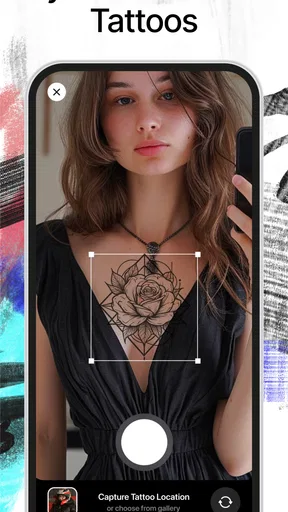
Imagine you are considering a small botanical tattoo but cannot decide between a simple sprig and a more ornamental arrangement. I would generate a few directions, save the strongest references, and compare them at the approximate size and body area I have in mind. The virtual preview can help with broad placement and visual balance, but it is only a mock-up: screen scale, body shape, and the final artist’s drawing can all change how the tattoo reads.
Before sharing a concept with an artist, I would note what I want to keep and what I want changed. For example, the overall silhouette might work while the leaves feel too crowded. That kind of feedback is more actionable than asking an artist to reproduce an AI image exactly, and it leaves room for professional adjustments that make the design more workable.
Worth Reading Before You Choose

EA SPORTS FC Mobile 26 Is a Bigger Football Game, but It Takes Time

Flipboard Shows What News Apps Must Do Beyond the Feed

Switching to Android Auto Means Rethinking Your Driving Routine

Google Calendar Makes a Crowded Week Easier to Manage

Ludo King Makes the Most of the Minutes Between Plans

Baby Panda World Brings Quick Play to Modern Phones, but Its Game Library Feels Busy
How it compares with browsing references
Compared with scrolling through general image searches or saved social posts, a generator offers a more direct way to explore variations around your own prompt. Reference browsing is still better when you want to study a particular tattoo tradition, see healed work, or find an artist whose real portfolio matches your taste. I would use both approaches: let Ink AI help shape the concept, then look for human-made examples and discuss the result with a tattoo professional.
Likewise, a drawing app gives you more deliberate control if you already know how to sketch, while a consultation is the better route for resolving technical questions about placement and execution. Ink AI sits between those options: it is approachable when you have an idea but not the skills or vocabulary to visualize it. Its convenience does not remove the need to check whether a design is original, suitable, and feasible before committing.
First Impressions
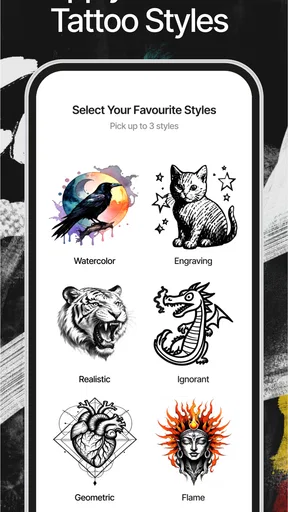
So, I downloaded Ink AI – Tattoo Design Maker with a mix of excitement and skepticism. I mean, can an app really capture the artistry of tattoo design? Well, the interface is slick and welcoming, making it super easy to dive right in. You’re greeted with a vibrant display of tattoo styles, which is perfect because who doesn’t love a bit of eye candy?
Features Galore
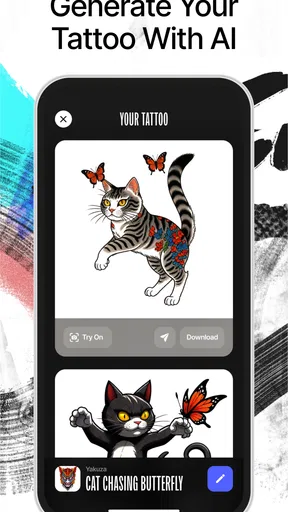
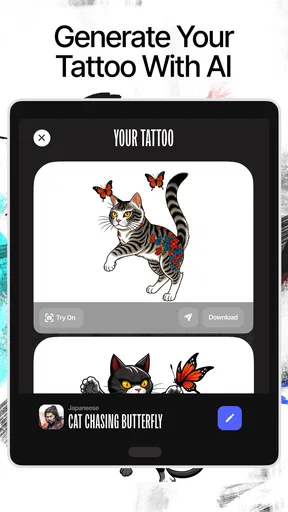
The app boasts a plethora of features designed to cater to both tattoo newbies and seasoned ink enthusiasts. One of the standout features is the AI-driven design generator. You simply input some preferences, and voila! You get a range of personalized designs. It’s like magic, but with technology.
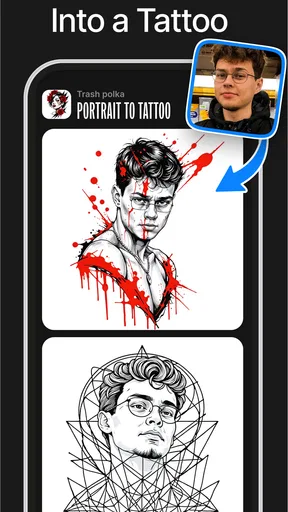
Another neat feature is the vast library of pre-existing designs. You can browse through countless styles, from minimalist to full-blown sleeves. Plus, the app allows you to customize these designs, which adds a personal touch that’s often missing in generic tattoo catalogs.
User Experience
Using the app is a breeze. Navigation is intuitive, and I barely needed a tutorial to figure things out. The design editor is particularly user-friendly, allowing you to tweak designs with pinch-and-zoom gestures. It makes you feel like a digital Picasso, minus the messy paint.
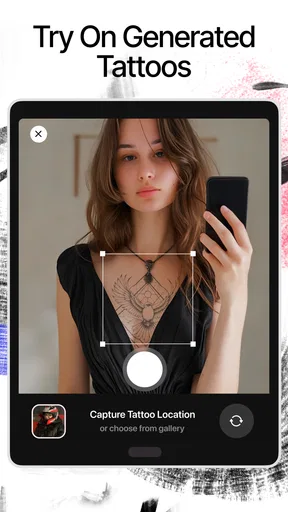
One thing I appreciated was the ability to try designs on virtual models. This feature lets you see how a tattoo might look on skin, which is a game-changer. It’s like test driving a car before you buy it, ensuring you avoid any ink-related regrets.
Community Vibes
The app also has a community aspect where users can share their creations and get feedback. It’s a supportive space, kind of like a social network for tattoo lovers. Seeing other people’s designs can be inspiring and might just spark your next tattoo idea.
Room for Improvement
While the app is pretty fantastic, no app is perfect. One thing that could be improved is the occasional lag when loading complex designs. It’s not a deal-breaker, but a smoother experience would be the icing on the cake.
Also, while the AI designs are impressive, they can sometimes feel a bit generic. A few more options for personalization could really take things up a notch.
Final Thoughts
All in all, Ink AI – Tattoo Design Maker is a must-have for anyone considering new ink. Whether you’re dabbling with your first tattoo idea or you’re a seasoned pro looking for fresh inspiration, this app has something for everyone. It brings the tattoo parlor experience to your fingertips, minus the buzzing needles.
So, would I recommend it? Absolutely. It’s a fun, creative, and handy tool that transforms the way you think about tattoos. Give it a go and see what kind of inked-up masterpiece you can create!
What to know before you install
The app is free to download and is rated for everyone, so there is no purchase required just to begin exploring. Optional in-app purchases range from $3.99 to $42.99 per item, which is worth keeping in mind if you are only looking for a quick burst of inspiration. I would first see how much of the idea-making process you can accomplish without paying, then decide whether any paid option genuinely fits the way you plan to use it.
It has a 3.6 average from around 15,000 ratings, alongside roughly 888 written reviews, and has passed one million installs. I read those figures as a reason to approach it with sensible expectations rather than as a verdict on your own experience: a design tool is most useful when its workflow suits the way you think. If you try it, judge it by whether it helps you make a clearer choice, not by whether every generated image feels ready to tattoo.
Version details and what they do—and do not—tell you
The app was released on February 6, 2024, and version 1.3.10 is the current version. Those are useful reference points for identifying the edition you are considering, but they do not by themselves show what changed between releases. I would not assume that a particular editor improvement or new design option arrived in this version unless it is visible in the app itself.
For someone already using it, the practical approach is to check the version installed on the device and then explore the controls again after updating. A small interface change can alter where a familiar tool sits, while the basic creative task—testing directions and refining a reference—remains the reason to open it. The minimum operating-system requirement is Android 7.0, so users on older devices should check compatibility before planning a session around it.
Getting better results without overcommitting
One useful habit is to keep a short note beside each promising image: what you like, what feels off, and what you would ask an artist to revise. That record prevents a visually striking preview from becoming the whole decision. It also helps when you compare several concepts later, because memory tends to favor the newest image rather than the one that best matches your original intention.
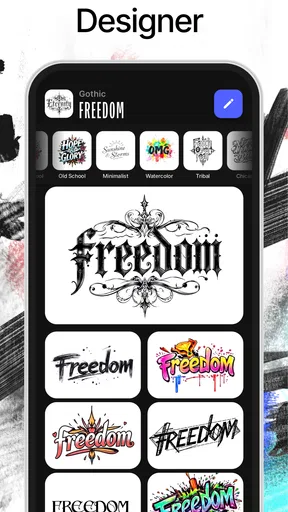
For lettering, I would be especially cautious. A generated word can look attractive on a screen while still needing careful checks for spelling, spacing, and legibility at the intended size. Treat text as something to verify separately, and have the final lettering drawn or checked by the tattoo artist rather than trusting a preview as a stencil. The same caution applies to fine details that might blur together when reduced to the actual tattoo scale.
Where the creative process can get stuck
AI images can create a false sense of completion: a polished-looking picture may still contain awkward anatomy, inconsistent details, or elements that do not translate cleanly into ink. I would inspect the design at more than one scale and ask whether its main shape remains readable without relying on tiny decoration. A simpler concept may be the stronger tattoo, even if a more elaborate preview initially grabs your attention.
The community can offer fresh perspectives, but feedback from other users is not the same as professional advice. If people respond enthusiastically to a concept, that can be encouraging; it does not settle questions about placement, durability, or how the design should be adapted. I would use community reactions to discover what catches the eye, then keep the final decision between myself and a qualified artist.
Who should look elsewhere
If your main goal is to draw every line yourself, a dedicated illustration app will give you more direct control. If you want to choose an artist, a portfolio is more informative than a generated sample because it shows that person’s actual work. And if you are ready to get tattooed but unsure about feasibility, a consultation is more valuable than spending hours generating alternatives.
Ink AI works best in the middle stage: after a vague idea has formed but before you have committed to a design or appointment. I would skip it if I wanted a guaranteed custom commission, exact technical guidance, or a substitute for an artist’s judgement. Used within that boundary, it can make the early brainstorming process less intimidating without pretending to solve every part of getting a tattoo.
What I would watch for as it develops
When considering future versions, I would pay attention to whether the app makes personalization more dependable and whether complex designs feel smoother to explore. Those are the areas that matter most to the experience described here, but they are things to watch for, not changes I can claim have already happened. I would also look for clear distinctions between a concept image, an editable design, and anything intended to guide a tattoo artist.
Pros
- Extensive library of tattoo designs.
- User-friendly interface for easy navigation.
- AI-powered customization options.
- High-quality design previews.
- Regular updates with new features.
Cons
- Limited free design options.
- In-app purchases can be pricey.
- Requires internet for full functionality.
- Occasional app crashes reported.
- Some features restricted to premium users.
FAQs for PreInk – Tattoo design maker
What is Ink AI – Tattoo Design Maker?
Ink AI – Tattoo Design Maker is an innovative app that leverages artificial intelligence to help users create unique tattoo designs. It offers a wide range of customizable templates and design tools, making it ideal for both tattoo enthusiasts and professional artists looking to explore new creative possibilities.
How does the AI feature work in this app?
The AI feature in Ink AI analyzes user inputs and preferences to generate personalized tattoo designs. By using machine learning algorithms, the app suggests design elements and modifications that align with the user’s style, ensuring a tailored and unique outcome for every creation.
Is Ink AI – Tattoo Design Maker suitable for professional tattoo artists?
Yes, Ink AI is designed to cater to both amateur tattoo enthusiasts and professional artists. The app provides advanced design tools and high-resolution outputs, allowing professionals to create detailed and intricate designs that can be directly used in tattoo sessions.
What customization options are available in the app?
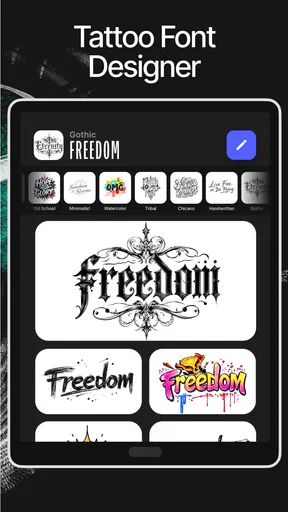
Ink AI offers extensive customization options, including a variety of design templates, color palettes, and adjustable elements like size, shape, and texture. Users can personalize their designs by adding text, overlays, and effects to achieve a truly unique tattoo design.
Is there a community or sharing feature within the app?
Yes, Ink AI includes a community feature where users can share their designs, get feedback, and connect with other tattoo enthusiasts. This feature fosters a collaborative environment, allowing users to explore trends, gain inspiration, and discuss tattoo-related topics.


